
Migrate from HTML to Native Runtime
Starting August 28, 2026, HTML (H5) mini games will no longer be accepted or supported on the TikTok Minis platform. Every mini game launched or maintained after that date must use the native runtime.
TikTok previously supported two runtime types for mini games: HTML (web-based builds that run in a webview) and native (compiled builds that run on TikTok's native runtime, with optimized performance, faster loading, and unified access to system capabilities). TikTok is standardizing on the native runtime, which delivers a better overall experience for players.
HTML mini game sunset timeline
If you currently have an HTML mini game on TikTok, you must migrate it to the native runtime. Existing HTML mini games will be sunset according to the following timeline.
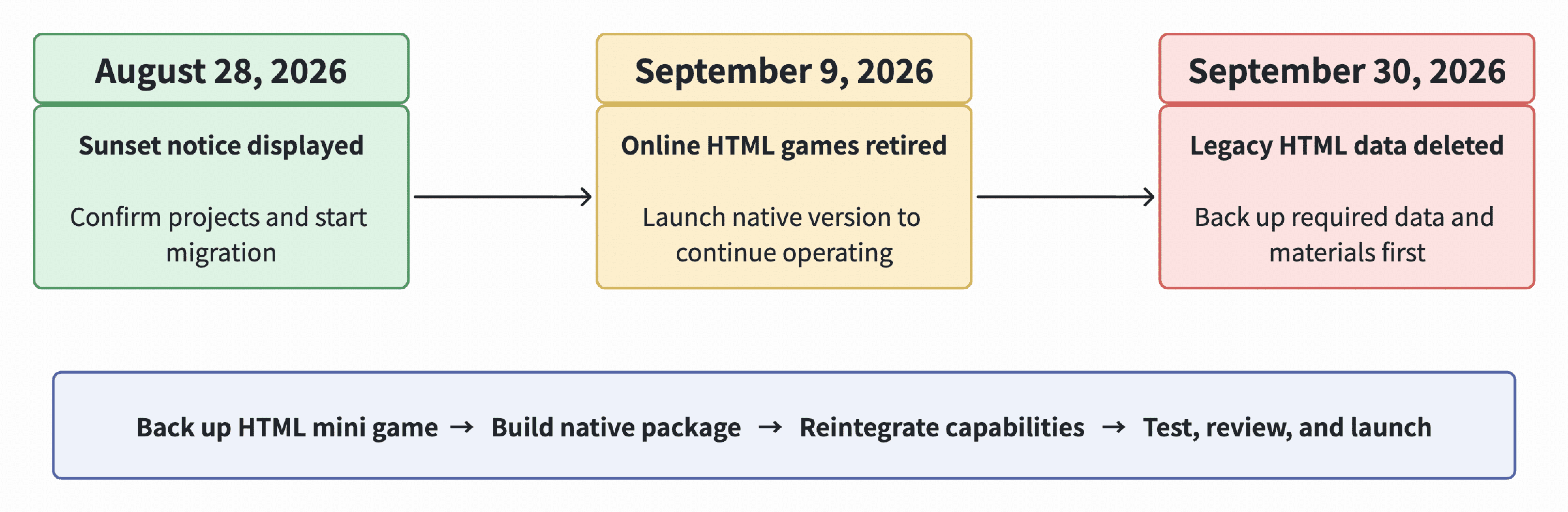
- August 28, 2026: The HTML sunset notice starts showing on the Developer Portal. Confirm affected projects immediately, back up HTML projects and data, and start native migration.
- September 9, 2026: Online HTML mini games are retired. New HTML mini games will not be supported. To continue operating a game, you must launch the native version and provide any required user notifications before this date.
- September 30, 2026: The TikTok Minis platform clears and deletes legacy HTML data. Before this date, back up all code, assets, configuration, business data, and related materials that you need to retain.
Important: Action is required before sunset: Do not wait until the HTML game is retired to start migration. To continue operating a mini game on the TikTok Minis platform, you must rebuild it and launch it as a native mini game.
Migrate to native runtime before HTML sunset
The TikTok Minis platform does not automatically convert an HTML game into a native mini game. To keep the game running after the HTML sunset, back up all necessary data and complete native runtime development, upload, review, and launch:
- Inventory and back up the HTML project: Save code, assets, configuration, server API information, and any save data, account, order, or user entitlement information that must be retained.
- Build a native runtime package: Use a Unity, Cocos, or Laya project to produce the native build. A standard website, game URL, web build directory, or HTML ZIP cannot be converted directly into a native runtime package.
- Reintegrate and validate platform capabilities: Reverify silent login, explicit authorization, IAAs, IAPs, sharing, and revisit capabilities. Complete DevTool debugging, real-device preview, platform testing, review, and production validation.
What is a native mini game?
A native mini game is a compiled mini game that runs on TikTok's native mini game runtime inside the TikTok app. Developers build games with mainstream engines such as Cocos, Unity, and Laya, then export a runtime package through platform-provided engine plugins or mini game publishing capabilities. The package is loaded and executed by the mini game runtime inside the TikTok app, without distributing the game as a standalone app through app stores. Learn more about the technical specifications of TikTok mini games.
Important: A standard website, game URL, or HTML ZIP package cannot be uploaded directly as a native mini game runtime package.
Renaming the entry file or recompressing the directory does not complete the conversion. You must export your project through the engine's mini game publishing capability or platform-provided plugin, following the required directory structure.
Start native mini game integration
You should start native runtime integration as soon as possible to allow adequate time for testing, review, and launch. Refer to the mini games development guide for a summary of required API integrations using native runtime. For game engine-specific development guides and debugging information, refer to the following.
Guide | Covers |
Unity plugin integration, IL2CPP to WebAssembly build, wasm / data package size control, subpackage limitation checks | |
Cocos / Laya build output, platform adaptation, runtime API integration, asset paths, subpackage configuration | |
Local debugging, remote debugging, real-device preview, upload, and platform testing with DevTool |
Handle user data and business flows
- Client-side local data: HTML progress, settings, and files do not automatically appear in Native. Implement game-side migration, recovery, or reinitialization for data that must be retained.
- Server-side data and user entitlements: Use game accounts and server mapping to verify access to saves, items, balances, and purchased entitlements. Compare actual HTML and native results before launch.
- Ads, payments, and re-entry: Revalidate ad rewards, payment fulfillment, historical entitlements, sharing, and revisit entries. Mock, local debugging, or preview results do not replace production validation.